In Part 1, we explored whether Claude Dashboard could create a genuinely useful analytical experience from a Power BI semantic model.
The answer was profoundly - yes.
Provided a Power BI Semantic Model, Claude Dashboard produced a rich, interactive dashboard using that connected to the Power BI semantic model, allowing the dashboard to display up-to-date data and respond to user interactions.
We were thrilled that this initial idea resonated with the community, but we wanted to take it one step further.
Could we take the dashboard Claude designed and publish it back into Power BI? Not as a screenshot. Not as an iframe pointing back to Claude Dashboard. Not as a separately hosted application. Could the complete dashboard produced by Claude Design run inside Power BI?
We now have that working.
Claude designs it. Power BI runs it.
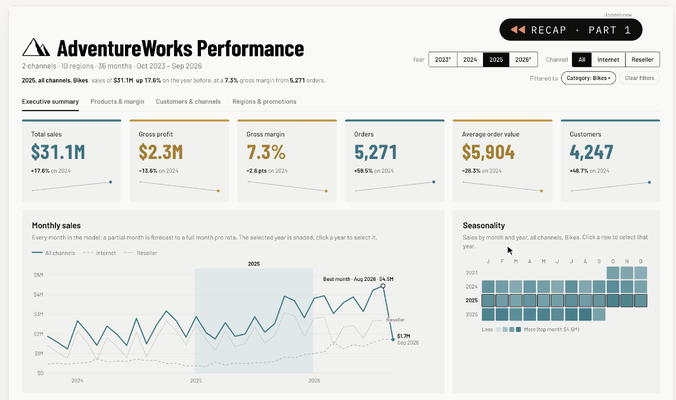
Once published, the dashboard runs entirely within Power BI. Claude is no longer involved. There are no calls back to Claude and no dependency on the Claude Dashboard service. The dashboard queries the Power BI semantic model through Power BI’s native visual interface. Calculations remain in the semantic model, using its existing measures, relationships and filter context.
That also means it operates within the normal Power BI security boundary:
- Row-level security
- Object-level security
- Workspace permissions
- Semantic-model access
- The identity and permissions of the current report user
Claude has effectively become the dashboard design environment.
Power BI remains the governed analytical platform.
Introducing the Super Visual
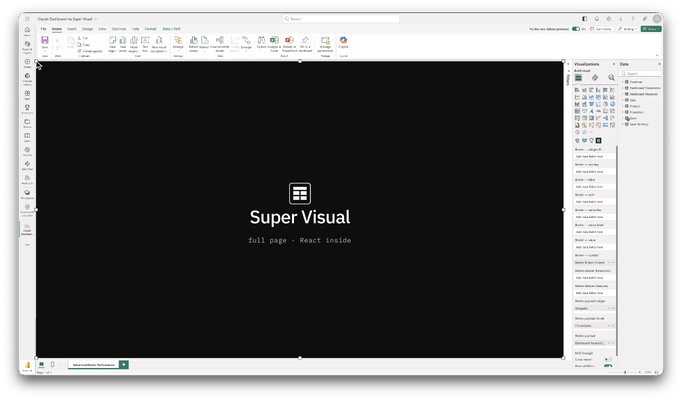
We achieve this by developing something we call the Super Visual.
The Super Visual is a Power BI custom visual designed to host complete web applications inside a report. It can run React applications, but it isn’t restricted to React. It can also package the HTML, CSS, JavaScript and and any other supporting libraries that would normally be available to a modern web application.
For the Claude Dashboard, we preserved its original HTML, styling, navigation and visuals, which are powered by D3. The dashboard still believes it is communicating with the same dashboard runtime Claude provided but behind that interface, the Super Visual translates its requests into Power BI queries and filter operations.
The runtime path becomes:
Claude-designed dashboard → Super Visual adapter → Power BI semantic model
The dashboard requests a dataset such as monthly sales, category performance or customer segments.
Power BI evaluates the request against the semantic model, applies the current security and filter context, performs the aggregation and returns only the bounded result required by that visualisation.
There is no copy of the business data inside the application and no external application cache.
Progressive hydration
Progressive hydration is a technique used by modern web applications that you would have experienced but may not be explicitly aware of. It's a technique whereby when a web page loads it first loads the page structure, loading "skeletons" and then the content arrives as it is loaded. It creates a more responsive and informative page design. The Super Visual employs the same approach.
A complete analytical application might contain dozens of visualisations across several pages. Loading everything simultaneously would create unnecessary model queries and delay the initial experience. The Super Visual therefore uses progressive hydration. The complete page structure appears immediately, with structured loading skeletons in place of unresolved charts and tables. Above-the-fold datasets are prioritised, and each visualisation is hydrated independently as its data arrives.
Only datasets required by the active page are requested. When the user changes page, the new page’s datasets are loaded as required.
Interactions selectively invalidate affected datasets rather than rebuilding the entire application.
This gives us the responsiveness of a web application while keeping the data processing inside the semantic model.
Moving beyond the standard Power BI canvas
This approach also lets us move beyond some of the long-standing constraints of Power BI’s standard report design system.
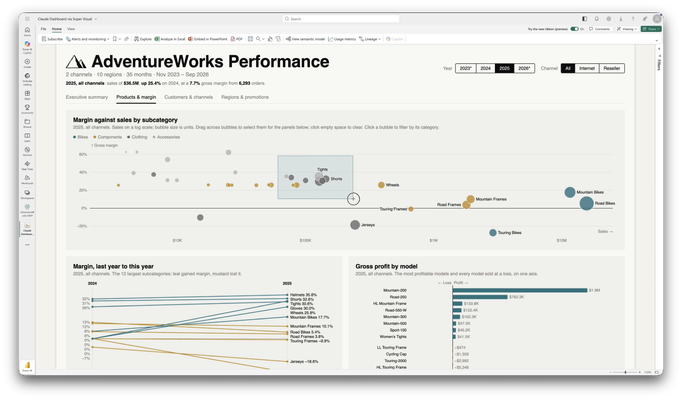
We can now support capabilities such as:
- Full-page scrolling
- Passive and continuous animation
- Animated transitions between analytical states
- Custom drag-and-drop interactions
- Brushing and lasso selection
- Rich cross-filtering between visualisations
- Stateful multi-page application navigation
- Bespoke tooltips and hover behaviours
- Progressive loading and skeleton states
- Responsive layouts
- Advanced typography and editorial design
- Canvas, SVG or WebGL-based visualisation
- Real-time information alongside analytical model data
- Guided analytical journeys rather than collections of independent tiles
Importantly though, this is not about abandoning Power BI.
It is about retaining Power BI’s semantic modelling, DAX, governance, security, distribution and enterprise controls while replacing the standard visual canvas with a much more capable application surface.
A new publishing pipeline
The next step is to make the process repeatable.
In principle, the pipeline looks like this:
- Claude generates a dashboard against our compatible data interface.
- The output includes the dashboard code and a machine-readable data manifest.
- We validate its dependencies, interactions and requested datasets.
- The data manifest is mapped to measures and dimensions in the target semantic model.
- The dashboard is compiled into the Super Visual.
- A Power BI report definition is generated and deployed to Fabric.
This means Claude can concentrate on composition, visualisation and interaction design. The semantic model remains responsible for business logic, aggregation and security. The Super Visual becomes the bridge between them.
The bigger idea
This is not limited to Claude Dashboard. The same architecture could support applications generated by other design tools, internal development teams or semi-deterministic design pipelines. The important part is the contract between the application and the semantic model. Once that contract is standardised, a dashboard can be designed using modern web technologies and deployed as a governed Power BI experience without rewriting the application from scratch. This changes the role of generative design tools considerably as they are no longer limited to just producing mock-ups or disposable prototypes; instead they can be used to produce deployable analytical applications.
Claude designs the dashboard. Power BI supplies the governed intelligence. The Super Visual brings them together.
#PowerBI #MicrosoftFabric #Claude #ClaudeDashboard #DataVisualisation #BusinessIntelligence #GenerativeAI